How to Use Emoji Symbols to Organize Your Printable Weekly Planner
Use emojis as a personal icon system on your printable weekly planner. Simple symbols like ☀️ and ⚡ make paper planning faster to scan.
You already use emojis every day to express yourself in texts and social posts. But here is something worth considering: those same symbols can double as a powerful organizational language for your paper planner. A sun for morning tasks. A lightning bolt for anything urgent. A checkmark for what is done. Once you build your own emoji icon system, you will scan your week at a glance instead of reading through line after line of text.
Key Takeaways:
- Emojis function as a personal shorthand icon system, not just communication tools
- They work better than color highlighters for black-and-white printed planners
- A small set of 6 to 10 emoji symbols covers most planning categories
- A structured weekly grid gives your emoji codes a consistent, repeatable home
- You can start with just three symbols and build your system over time
Why Emojis Were Always Meant to Be Symbols
Most people think of emojis as reactions and expressions. That is only half the story. According to the emoji origin article on Wikipedia, the first emoji set was created in 1999 by Shigetaka Kurita for a Japanese mobile platform, and the goal was always visual communication efficiency. Kurita drew on weather forecasts, road signs, and Chinese characters as inspiration. In other words, emojis began as informational icons, not emotional ones.
That origin matters. It means emojis are structurally similar to the pictogram tradition used on warning signs, airport terminals, and public maps for decades. Those symbols work because the human brain processes visual icons faster than written words. Your planner can use the same principle.
The Problem with Planning in Full Sentences
Think about the last time you wrote out a task list. Did you write "Call dentist office to confirm Thursday appointment" when you could have written "Dentist" and still remembered the same thing? Most planners fill up fast because we over-explain ourselves to ourselves.
Emojis fix this. When you assign a consistent symbol to a category, you stop needing words to carry the full load. You write less, see more, and make decisions faster as you scan the page.
There is another problem that often goes unmentioned. Most of us plan on paper using black-and-white printouts. Color-coded systems look beautiful in social media flat-lays, but the moment you print your planner without a color printer, those highlighter categories vanish entirely. Emoji symbols survive printing completely intact. They are greyscale-friendly by design, and they do not cost you a set of markers.
Building Your Personal Emoji Icon System
The best emoji systems are small and personal. Aim for 6 to 10 symbols maximum. More than that creates a reference problem where you forget what each one means and end up ignoring the system altogether.
Here is a suggested starter set of symbols and what they can represent in a planning context. Adapt these to your own life and drop any that do not fit your workflow.
- ☀️ Morning task or early-day priority
- high voltage emoji Urgent, needs action today
- check mark button emoji Completed
- telephone receiver emoji Call or communication task
- person running emoji Movement, exercise, or errand
- money bag emoji Financial task or bill to pay
- bullseye emoji Focus block or deep work session
- repeat button emoji Recurring weekly task
- ❤️ Personal or self-care time
- hourglass not done emoji Waiting on someone else
You do not need all of these. Start with three and add more only when you notice a gap in your system.
Why Emojis Beat Color Highlighters for Black-and-White Planners
People reach for highlighters as their first organizational tool. It makes sense visually, but the approach has real limits. Here is a side-by-side look at how the two compare.
Emoji Icons vs. Color Highlighters: A Planning Comparison
| Feature | Emoji Icon System | Color Highlighter System |
|---|---|---|
| Works in black-and-white print | Yes | No |
| Survives photocopying | Yes | Rarely |
| Requires physical supplies | No | Yes, multiple markers |
| Scannable at a glance | Yes | Yes |
| Meaningful without color | Yes | No |
| Easy to add mid-page | Yes | Messy after the fact |
| Works both digitally and on paper | Yes | Paper only |
The emoji system wins on practicality for anyone printing their planner at home. You type the symbols into your template before printing, and they appear bold and clear in any greyscale output. No markers needed, no bleed-through on thin paper, and no re-buying supplies.
How a Weekly Grid Gives Your Symbols a Consistent Home
A random to-do list does not get the most out of an emoji system. When symbols are scattered across a notebook with no structure, you still have to hunt for items by day or context.
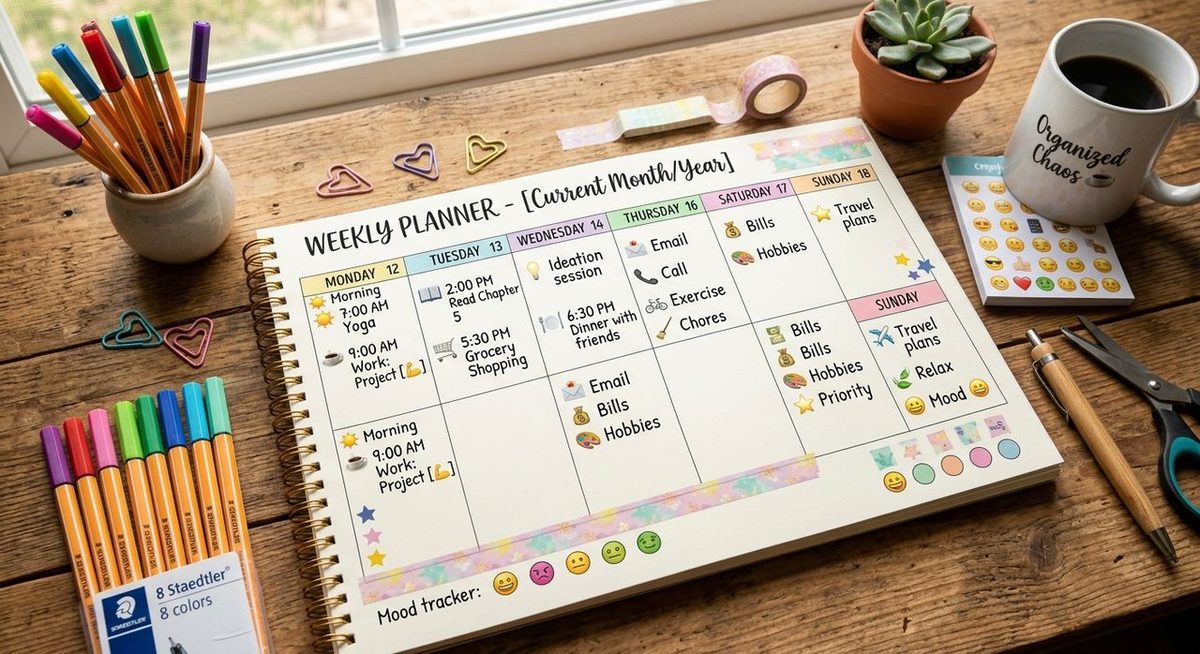
A structured weekly grid changes this. When every day has its own defined column or section, your emoji categories always appear in the same position. You know that Monday's ⚡ urgent items sit in a predictable spot. You know your ☀️ morning tasks are always in the top third of each day's box. The structure makes the system faster to use.
This is where a printable weekly planner becomes a genuinely practical tool. Instead of building a custom grid from scratch, you can download a ready-made layout and add your emoji codes directly before printing. The grid is already there. You just bring your icon system to it.
Look for a layout that has enough white space per day to fit your symbols plus a few words of context. Cramped layouts limit the system before you even start.
Customizing the System to Fit Your Life
No two people plan the same way. A freelancer running multiple client projects will need different symbols from a parent managing a household schedule. The process of choosing your emoji set is actually a mini planning audit in disguise.
Ask yourself what categories always appear in your week. If you always track exercise, give it a symbol. If you manage a side business, make sure financial tasks and client communication each have their own icon. If your week involves a lot of waiting on other people, the ⏳ symbol will save you from writing "waiting on reply" a dozen times across the page.
Once you pick your symbols, write them down on a small reference card and keep it clipped to the front of your planner. Treat it like a legend on a map. After two or three weeks of consistent use, you will have memorized the system and no longer need the card at all.
Keeping the System Alive Long-Term
Most planning systems fail after a few weeks. The usual reason is friction. The system becomes more work than it saves, and people quietly stop using it.
Emoji systems have a lower friction ceiling than most. The symbols are already on your keyboard or available with a copy-paste. They take one character instead of a full descriptive word. And because they are visual, reviewing your week requires less active reading and more pattern recognition.
The key to keeping any system running is consistency, not perfection. If you skip a day or forget to add symbols to a few tasks, do not restart from zero. Just pick up where you left off. The system does not need to be complete to be useful. Even partial emoji coding speeds up your weekly review and saves time compared to reading raw text.
Your Emoji Planner Starts With One Symbol
The most common reason people never try something new is that they wait until they feel ready to do it fully. You do not need to assign symbols to every task before your system counts.
Pick one emoji that covers your most common type of task this week. Add it to three items. That is the entire first step.
By the end of the week, you will have a feel for whether the system adds real value. Most people who try it stick with it, because the visual feedback of seeing a page of symbols is more satisfying than a page of dense text. Your planner starts looking like a dashboard instead of a diary, and that shift in feel is often exactly what turns planning from a chore into a habit you actually keep.